

A cluttered desk is a productivity killer. Going wireless with your keyboard and mouse doesn’t just clean up cable management it gives you the freedom to position your peripherals exactly where they’re most comfortable. In 2026, wireless keyboard and mouse technology has matured to the point where you simply cannot tell the difference from wired except for the cable you’re not tripping over.
WirelessGearGuide.com tested 20+ combinations across typing feel, tracking precision, battery life, and wireless reliability. Here are our favorites.
What to Look for in a Wireless Keyboard and Mouse Combo
- Connection type: 2.4GHz USB dongle (faster, more reliable) vs Bluetooth (more compatible, no dongle needed)
- Battery life: Look for keyboards with 12+ months and mice with 6+ months per charge/battery
- Key switch type: Scissor switches for laptops, mechanical for desktop use, membrane for quiet offices
- Mouse DPI range: 800-4000 DPI is sufficient for most users; gamers want up to 25,600 DPI
- Ergonomics: Contoured mice and angled keyboards reduce wrist strain during long sessions
Top 6 Wireless Keyboard and Mouse Combos in 2026
1. Logitech MX Keys S + MX Master 3S — Best Overall
The MX Keys S and MX Master 3S combination is the gold standard for productivity. The MX Keys S features satisfying low-profile keys with backlighting, USB-C charging, and simultaneous connection to three devices via Easy-Switch buttons. The MX Master 3S is the finest wireless office mouse ever made, with an electromagnetic MagSpeed scroll wheel that can scroll 1,000 lines per second, a precision thumb wheel, and a 200-8000 DPI optical sensor.
| PROS | CONS |
| ✓ Best-in-class scroll wheel | ✗ Expensive ($200+ for combo) |
| ✓ MX Keys S types beautifully | ✗ Large, not travel-friendly |
| ✓ 3-device multipoint | ✗ Windows-optimized layout |
| ✓ USB-C charging for both | ✗ No RGB lighting |
2. Logitech MK850 — Best Value Combo
At $100, the MK850 offers excellent value with Bluetooth multi-device support for up to three devices, a full-size keyboard with numpad, and a sculpted mouse that feels comfortable for extended use. Battery life is exceptional up to 36 months for the keyboard with AA batteries and 24 months for the mouse.
3. Keychron K8 Pro + Logitech G305 — Best Mechanical Keyboard Combo
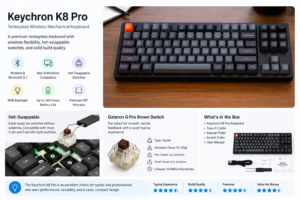
For those who love the feel of mechanical key switches, the Keychron K8 Pro with Gateron G Pro switches is the best wireless mechanical keyboard in this price range. Pair it with the Logitech G305 LIGHTSPEED wireless gaming mouse for a reliable, responsive combo that doubles for both productivity and gaming. Both support Bluetooth and USB-A/C connections.
4. Microsoft Designer Compact — Best for Travel and Minimal Setups
The Microsoft Designer Compact Keyboard is ultra-slim (only 4mm at the thinnest point), Bluetooth-only, and features Microsoft’s Emoji key and Copilot AI integration. Pair it with the Microsoft Bluetooth Mouse for a complete travel-friendly setup under $80. Battery life is rated at 36 months for the keyboard.
5. Logitech Signature K650 + M750 — Best for Small Hands
The Signature K650 features a comfortable palm rest built into the keyboard, quiet low-profile keys, and USB-C charging. The M750 mouse is available in small and large sizes the small version is perfect for users with smaller hands or those who prefer a fingertip grip style. Together they’re around $90 and excellent for casual users.
6. Razer Turret for Xbox — Best for Living Room / Gaming
The Razer Turret is designed specifically for couch gaming on Xbox consoles and PC. The magnetic mouse pad built into the keyboard means the mouse never slides off your lap, and the wireless range covers a full living room. It’s a niche product but does what no other product does as well.
2.4GHz vs Bluetooth: Which Connection is Better?
| Factor | 2.4GHz USB Dongle | Bluetooth |
| Latency | 1ms (polling rate dependent) | 7-15ms |
| Range | ~10m | ~10m |
| USB Port Required | Yes | No |
| Multi-Device | Usually 1 device | Up to 3 devices |
| Compatibility | PC/Mac only (with dongle) | Any Bluetooth device |
| Gaming Suitable | Yes | Marginal |


No Comments
Leave Comment