
Your Wi-Fi router is the most important networking device in your home. A bad router creates frustration dropped video calls, buffering, dead zones in the bedroom, and lag in multiplayer games. A great router disappears into the background and just works. In 2026, Wi-Fi 6E has matured and Wi-Fi 7 routers have arrived at consumer price points.
At WirelessGearGuide.com, we’ve tested routers in real homes not just in controlled lab environments and the results are enlightening. Here are the best routers you can buy in 2026.
Wi-Fi Standards Explained: 5, 6, 6E, and 7
| Standard | Frequency Bands | Max Speed (Theory) | Best For |
| Wi-Fi 5 (802.11ac) | 2.4GHz + 5GHz | 3.5 Gbps | Budget, basic use |
| Wi-Fi 6 (802.11ax) | 2.4GHz + 5GHz | 9.6 Gbps | Dense device environments |
| Wi-Fi 6E (802.11ax) | 2.4 + 5 + 6GHz | 9.6 Gbps (per band) | Gaming, 4K streaming, low latency |
| Wi-Fi 7 (802.11be) | 2.4 + 5 + 6GHz | 46 Gbps | Future-proofing, multi-gig |
Wi-Fi 6E adds a new 6GHz frequency band that’s essentially interference-free since very few devices currently use it. This means lower latency, faster speeds in crowded environments (apartments, dense neighborhoods), and a dedicated highway for your newest devices. Wi-Fi 7 adds Multi-Link Operation (MLO), which allows a device to use multiple bands simultaneously for even lower latency.
Top 6 Wi-Fi Routers for 2026
1. TP-Link Archer BE800 (Wi-Fi 7) — Best Wi-Fi 7 Router
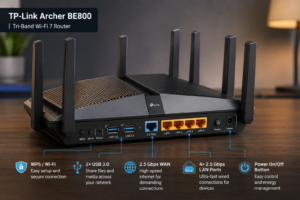
The TP-Link Archer BE800 is our top Wi-Fi 7 pick for 2026. It delivers tri-band Wi-Fi 7 with combined theoretical speeds of up to 19 Gbps, 10G and 2.5G WAN ports, and support for 320MHz channels in the 6GHz band. Real-world performance in our testing showed consistent 1.5-2 Gbps speeds at 10 meters impressive. At $349, it’s become surprisingly affordable for Wi-Fi 7.
2. ASUS RT-BE88U (Wi-Fi 7) — Best for Gaming
ASUS built the RT-BE88U for serious gamers with features like Adaptive QoS (automatically prioritizes gaming traffic), ASUS AiMesh for expanding to a mesh system, and a dedicated gaming port that bypasses the router’s NAT for minimal latency. Port selection is excellent: two 10G ports, one 2.5G WAN, and four 1G LAN ports.
3. Eero Pro 6E — Best Mesh Wi-Fi System
For large homes that need whole-home coverage, the Eero Pro 6E is the simplest and most reliable mesh system available. The app-based setup takes under 10 minutes, Amazon regularly pushes automatic security updates, and Thread networking support means your smart home devices get a dedicated, low-power mesh network. Tri-band with a dedicated 6GHz backhaul.
4. TP-Link Deco XE75 — Best Budget Wi-Fi 6E Mesh
At $199 for a 2-pack covering 4,500 sq ft, the Deco XE75 is the best budget Wi-Fi 6E mesh system. The 6GHz backhaul band ensures the mesh nodes communicate at high speeds, reducing congestion on the 5GHz band used by your devices. Setup is dead simple via the Deco app.
5. Netgear Nighthawk RAX80 (Wi-Fi 6) — Best Mid-Range Single Router
Not everyone needs Wi-Fi 6E or Wi-Fi 7. If you have a medium-sized home (under 2,500 sq ft) and don’t have many Wi-Fi 6E devices, the Netgear Nighthawk RAX80 provides excellent Wi-Fi 6 performance at a reasonable price. Eight Gigabit LAN ports, a 2.5G WAN port, and strong QoS make it great for home offices.
6. GL.iNet GL-MT6000 (Flint 2) — Best for Advanced Users
The GL.iNet Flint 2 is a Linux-based router running OpenWrt out of the box, giving advanced users complete control over their network configuration. Wi-Fi 6 performance is excellent, it supports WireGuard and OpenVPN natively, and the 2.5G ports provide plenty of throughput. At $130, it’s incredible value for a power user.
How to Choose the Right Router for Your Home
Home Size and Coverage
- Under 1,000 sq ft — Any single Wi-Fi 6 router will cover you
- 1,000–2,500 sq ft — Wi-Fi 6 or 6E single router with good antenna design
- 2,500–5,000 sq ft — Mesh Wi-Fi system (Eero, TP-Link Deco, Google Nest)
- Over 5,000 sq ft or multi-floor — Enterprise-grade mesh or wired access points
How Many Devices Can a Router Handle?
A Wi-Fi 5 router comfortably handles 20-30 devices. Wi-Fi 6 and 6E routers can handle 100+ devices efficiently, thanks to OFDMA (Orthogonal Frequency Division Multiple Access) and MU-MIMO (Multi-User, Multiple Input, Multiple Output) technologies that allow the router to serve multiple devices simultaneously on the same channel.


Leave Comment