
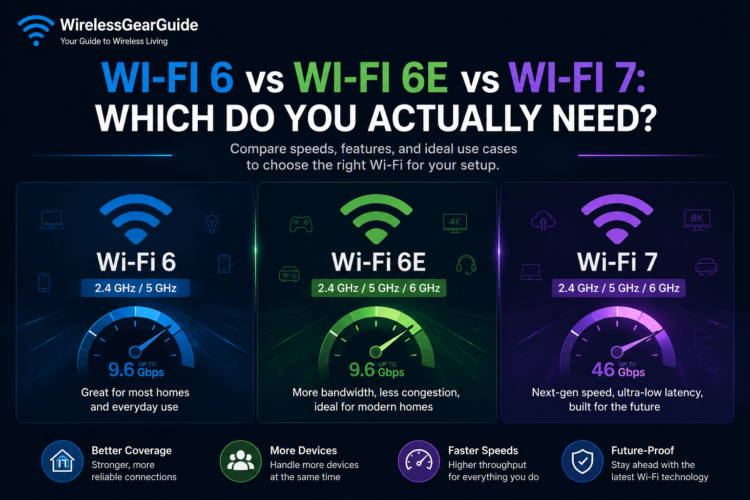
Wi-Fi marketing has gotten confusing. We went from numbered standards (802.11ac) to friendly names (Wi-Fi 5) to now having three closely related but meaningfully different standards being sold simultaneously: Wi-Fi 6, Wi-Fi 6E, and Wi-Fi 7. Buying a new router or laptop and not sure which standard you need? This guide from WirelessGearGuide.com breaks it all down.
The Quick Summary
| Standard | Year | Bands | Max Speed | Key Feature | Should You Upgrade? |
| Wi-Fi 6 (802.11ax) | 2019 | 2.4 + 5 GHz | 9.6 Gbps | OFDMA, MU-MIMO | Yes, if on Wi-Fi 5 or older |
| Wi-Fi 6E (802.11ax) | 2021 | 2.4 + 5 + 6 GHz | 9.6 Gbps per band | 6GHz spectrum | Yes, if in dense area or gaming |
| Wi-Fi 7 (802.11be) | 2024 | 2.4 + 5 + 6 GHz | 46 Gbps | MLO, 320MHz channels | Optional, future-proofing |
Wi-Fi 6: The Baseline
Wi-Fi 6 introduced OFDMA and uplink MU-MIMO, which allow a single router to serve many devices simultaneously rather than one at a time. This is why Wi-Fi 6 performs significantly better in dense environments like apartments, offices, and homes with 30+ connected devices not because of raw speed, but because of efficiency.
If you still have a Wi-Fi 5 (or older) router and you have 10+ devices connected, upgrading to Wi-Fi 6 will likely make a noticeable improvement in overall network responsiveness, even if your internet plan doesn’t change.
Wi-Fi 6E: The 6GHz Advantage
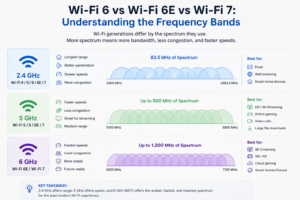
The ‘E’ in Wi-Fi 6E stands for Extended specifically, extended into the 6GHz frequency band. The 6GHz band has two critical advantages in 2026: very few devices currently use it (meaning almost no interference), and it offers 1,200 MHz of spectrum compared to 500 MHz available in the 5GHz band.
This means Wi-Fi 6E can create many more non-overlapping channels, dramatically reducing congestion. In our testing in a dense apartment building, a Wi-Fi 6E router showed 40% lower latency and 60% fewer connection drops compared to the same router’s 5GHz band during peak evening hours.
Wi-Fi 7: The Future Is Now
Wi-Fi 7’s headline feature is Multi-Link Operation (MLO), which allows a device to use multiple bands simultaneously and bond them together for higher speeds and lower latency. Instead of connecting to either the 5GHz or 6GHz band, a Wi-Fi 7 device can use both at the same time.
Wi-Fi 7 also introduces 320MHz channel width (double Wi-Fi 6E’s 160MHz) and 4096-QAM (up from 1024-QAM in Wi-Fi 6/6E), enabling peak theoretical speeds of 46 Gbps though real-world speeds will be a fraction of this for years to come.
The Honest Upgrade Recommendation
Upgrade to Wi-Fi 6 if…
- You’re on Wi-Fi 5 or older with 10+ connected devices
- Your budget is $80-$150 for a new router
- You don’t live in a very dense apartment building
Upgrade to Wi-Fi 6E if…
- You live in a dense urban environment with many competing Wi-Fi networks
- You play online games or use video conferencing professionally (latency matters)
- Your budget allows $150-$300 for a router
- You have newer devices (2022+) with 6GHz support
Consider Wi-Fi 7 if…
- You’re building a new home network and want maximum longevity
- You have a multi-gig internet plan (1 Gbps+)
- Your budget allows $300-$400 for a router
- You want to future-proof for devices releasing in 2026-2027
Device Compatibility: Do You Have Wi-Fi 6E or 7 Clients?
A router upgrade only benefits devices that support the new standard. Most laptops released after 2022 support Wi-Fi 6E. iPhones support Wi-Fi 6E starting with iPhone 15 Pro, and Wi-Fi 7 with iPhone 16. Samsung Galaxy phones support Wi-Fi 6E from Galaxy S21 Ultra onwards and Wi-Fi 7 from Galaxy S24 series.


Leave Comment